

A pipe spool touches more people than almost any other deliverable on an MEP job. A detailer models it, a BIM manager releases it, a cutter, fitter, welder, and QC inspector build it, a driver ships it, and a foreman hangs it. Every handoff is a chance for the information behind that spool to get lost, re-typed, or out of date.
Most contractors have strong tools at individual stages. The weak point is the space between them. Understanding the full lifecycle, and what information has to move at each step, is the first step toward closing those gaps.
What is the pipe spool lifecycle? The pipe spool lifecycle is the full path a prefabricated pipe assembly follows, from its creation in a BIM model, through spool sheet production, shop fabrication, quality control, and shipping, to installation and verification in the field. In a connected workflow, a single digital record for each spool carries its geometry, materials, status, and quality data through every stage.
Why the Spool Lifecycle Breaks Down
BIM-driven fabrication is no longer new. The challenge is connecting it end to end. The Dodge Construction Network SmartMarket Brief, Optimizing Digital Fabrication for Mechanical Contractors, makes that clear:
- 87% of mechanical contractors used BIM in the past 12 months, and 100% of large firms did.
- 42% have been fabricating from BIM for 10 years or more.
- 54% use fabrication management software, rising to 70% among large contractors and falling to 42% among small ones.
- 30% of large contractors cite the complexity of integrating BIM models with existing fabrication workflows as a major obstacle, versus 22% overall.
- 25% of large contractors flag data interoperability issues, and 23% cite inaccurate model information.
In other words, most shops can model a spool. Far fewer can move that spool’s data cleanly into the shop and out to the field. That gap costs more every year. Deloitte’s 2026 Engineering and Construction Industry Outlook estimates the U.S. needs 499,000 new construction workers in 2026. When skilled labor is this scarce, nobody can afford hours spent re-entering data, hunting for spools, or redoing work built from an outdated revision.
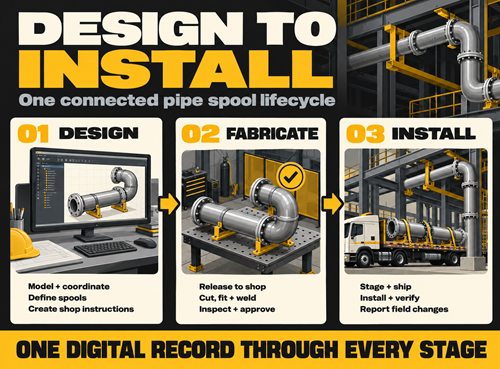
The 7 Stages of the Pipe Spool Lifecycle
Here is how a spool moves from the Revit model to the jobsite, and the information that has to travel with it at each step.
- Model and coordinate in Revit. Detailers build fabrication-level piping using real manufacturer content, then clash-detect against structure and other trades. Information created: geometry, pipe sizes, materials, fittings, connection types, and system assignments. Accuracy here sets the ceiling for everything downstream.
- Break the model into spools. The run is divided into shippable, installable assemblies based on transport limits, weld access, and install sequence. Information created: spool numbers, naming conventions, field weld locations, and package groupings. Rules-based spooling inside Revit keeps numbering and breakpoints consistent from project to project.
- Produce spool sheets and fabrication data. Each spool gets a drawing with dimensions, a bill of materials, a cut list, and weld identifiers. Information created: the shop’s instructions. Automating this step is where the biggest time savings sit. Brandt Companies went from about 60 spool sheets per day to more than 300 using MSUITE BIM in Revit.
- Release to the shop. Spools are published to fabrication as packages with a revision and a priority. Information transferred: drawings, BOMs, cut lists, and the target ship date. This is the most common break point. When drawings are emailed or printed, nothing stops a superseded revision from reaching the floor.
- Fabricate and inspect. The spool moves through cutting, fit-up, welding, and QC. Information created: station status, labor hours, welder IDs, heat numbers, weld logs, and inspection results. Barcode or QR scans at each station capture this as work happens, not at the end of the week.
- Stage and ship. Finished spools are grouped by install area and delivered to match the field sequence. Information transferred: packing lists, delivery dates, and location. The field should know what is on the truck before it arrives.
- Install and verify in the field. Crews locate spools, hang them, and confirm installation. Information created: install status, as-built changes, and issues that feed back to detailing. Layout points generated from the model can drive robotic total stations, tying placement directly back to the design.
The pattern is simple. Most stages create information, but stages 4 and 6 only move it. The handoffs are where spools go missing, revisions get crossed, and quality records end up in a binder no one can find.
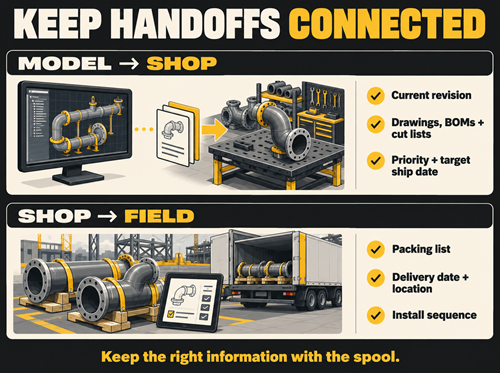
What a Connected BIM-to-FAB-to-Field Workflow Changes
When one digital record follows each spool through all seven stages, the handoffs stop being gaps.
- One current revision. The shop builds from what was released in the model, not from a printout in a folder.
- Live status for everyone. PMs, shop leads, and foremen see where every spool sits without walking the floor or calling the shop.
- Traceable quality. Weld logs, heat numbers, and inspections attach to the spool itself and travel with it to turnover.
- Feedback to design. Field issues and shop rework flow back to detailers, so the next model is better than the last.
AZCO, a heavy industrial contractor in Wisconsin, saw this firsthand. Before MSUITE, the team ran pipe fabrication on paper spool drawings, Excel, and a homegrown system with no real-time tracking. After rolling out MSUITE with iPads at cutting, fit-up, welding, and loading, project managers gained live insight into spool location and package status, and QA/QC moved off paper into centralized digital workflows.
The payoff is largest on data center and industrial work. These projects bring compressed schedules, repetitive piping modules, and heavy prefabrication. Deloitte projects U.S. data center power demand could grow more than fivefold by 2035. Contractors who can show an owner exactly where every spool stands, and prove its quality record, win the trust that wins the next job.
Frequently Asked Questions
What is the end-to-end pipe spool lifecycle from BIM model to field installation?
It is the full path of a prefabricated pipe assembly: modeling and coordination in Revit, spooling, spool sheet and BOM production, release to the shop, fabrication and QC, staging and shipping, and field installation and verification. A connected lifecycle keeps one digital record for each spool across every stage.
How does a pipe spool move from Revit model through fabrication to field installation?
The model is broken into spools, and each spool gets a drawing, bill of materials, and cut list. Those are released to the shop as packages, tracked station by station through cutting, fit-up, welding, and inspection, then staged and shipped by install area. Field crews install and confirm each spool, and issues feed back to detailing.
Where do most pipe spool fabrication errors happen?
Most errors happen at handoffs, especially the release from BIM to the shop. Emailed or printed drawings make it easy for a superseded revision to reach the floor. Pipe fabrication software that publishes spools directly from the model removes that risk.
What is the difference between BIM software and pipe fabrication software?
BIM software creates and coordinates the model and spool drawings. Pipe fabrication software manages what happens next: shop workflows, station status, labor, QA/QC, and delivery. The best results come when the two share the same spool data instead of being linked by spreadsheets.
Connect Every Stage of the Spool Lifecycle
MSUITE, part of the DEWALT Construction Technology platform, connects the full spool lifecycle in one system. MSUITE BIM automates spooling and spool sheets inside Revit. MSUITE FAB tracks every spool through the shop in real time. MSUITE FAB carries status and delivery information to the jobsite. Contractors using MSUITE report 25 to 30% gains in shop productivity after connecting BIM, fabrication, and field workflows.
Book a demo with MSUITE to see how MEP and industrial contractors move pipe spools from Revit model to field installation without losing a single piece of information along the way.
Sources: Dodge Construction Network, Optimizing Digital Fabrication for Mechanical Contractors SmartMarket Brief · Deloitte 2026 Engineering and Construction Industry Outlook · Brandt case study · MSUITE AZCO case study (DEWALT, 2026)