
A due-diligence guide for MEP and industrial contractors evaluating a fab shop management platform
Fabrication shop software has become a crowded category, and every vendor claims the same things: faster spooling, fewer errors, real-time visibility. MEP and industrial contractors have learned to be skeptical of those pitches. A 2026 Dodge Construction Network study found that 82% of owners and general contractors now require fabrication capability when selecting a mechanical contractor — which means the software behind that capability has real business stakes, not just shop-floor convenience.
Rather than trust a demo alone, experienced buyers lean on peer networks, reference calls, and pilot programs before signing a contract. Here are the questions worth asking before you commit to fab shop management software, along with what separates a genuine fit from a polished sales pitch.
Why Vetting Matters More Than Ever
Fabrication management software is no longer a nice-to-have. Dodge’s research shows that nearly three-quarters of large mechanical contractors ($100M+ in revenue) already use it, and 87% of current users have adopted a commercial platform rather than a homegrown system — a sign that in-house spreadsheets and legacy tools are losing out to purpose-built software across the industry. But adoption comes with risk: the wrong platform can mean a stalled rollout, a tool your BIM and shop teams abandon within a year, or a system that can’t talk to the rest of your tech stack. That’s why the vetting process matters as much as the product itself.
Source: Dodge Construction Network, Optimizing Digital Fabrication for Mechanical Contractors
8 Questions to Ask Before You Buy
- Does it connect BIM, fabrication, and field in one workflow? The software should move data from the model to the shop floor to the jobsite without manual re-entry. If spool information, statuses, or drawings require re-keying at each stage, you haven’t eliminated the errors you’re trying to fix — you’ve just moved them.
- Can it integrate with your existing tech stack? Ask specifically which BIM authoring tools, ERP systems, CNC and cutting equipment, and project management platforms it connects to today, not on a future roadmap. Integration gaps are consistently cited as a top purchase barrier for fabrication software buyers.
- What does implementation actually look like? Request a real rollout timeline, not a marketing estimate. Ask who leads training, how long onboarding takes for shop foremen versus BIM detailers, and when you should expect to see measurable value on a live project.
- Can I run a pilot before committing company-wide? A vendor confident in its product should welcome a scoped pilot on a single project or shop. This is the single best way to validate performance claims against your actual workflows before a full rollout.
- What results can current customers point to? Ask for references in your trade and at your company size — not just logos on a website. Peer validation carries more weight than any vendor-produced statistic, and a vendor should be able to connect you directly with customers willing to talk.
- How does it handle QA/QC and traceability? For piping and industrial fabrication especially, ask how weld logs, inspections, and code-driven steps are tracked and audited. Digital traceability should replace side spreadsheets and paper travelers, not add another parallel system.
- Will it scale across shops, trades, or projects? A platform that works well for a single shop or project can still break down at scale. Ask how the software handles multi-project capacity planning, multi-trade coordination, and reporting roll-ups across locations.
- What happens after go-live? Understand the support model, pricing as your usage grows, and how the vendor handles feature requests or issues once the sales team hands you off to customer success.
Vendor Evaluation Checklist
Use this table as a working reference during vendor calls and demos.
| Category | Ask the Vendor | Why It Matters |
| BIM-to-Field Connectivity |
|
|
| INTEGRATIONS |
|
|
| IMPLEMENTTION |
|
|
| PROOF OF RESULTS |
|
|
| QA/QC & TRACEABILITY |
|
|
| SCALABILITY |
|
|
| SUPPORT & PRICING |
|
|
Proof Over Promises: Two Reference Case Studies
AZCO (Burns & McDonnell) — From Paper Travelers to Real-Time QA/QC
Before adopting MSUITE, AZCO’s pipe fabrication department ran on paper spool drawings, spreadsheets, and a homegrown system with no real-time visibility. Matthew Benner, AZCO’s Pipe Fabrication Department Manager, said the team was “still having paper copies flowing through from a QA/QC standpoint.” After rolling out MSUITE — including on-site training and a phased onboarding across concurrent projects — AZCO’s biggest gain came in quality control: weld logs, inspections, and code-driven steps moved into a single digital system, cutting reliance on side spreadsheets and giving leadership live visibility into every active project. The team is now extending that structured data into Power BI for multi-project capacity planning.
Bassett Mechanical — Standardizing BIM-to-Fabrication at Scale
Bassett Mechanical adopted MSUITE to bring consistency to BIM-to-fabrication workflows across complex, concurrent projects. The results included streamlined communication between BIM, fab, and field teams, fewer production bottlenecks, a shift from paper-based workflows to digital processes, and stronger traceability across the fabrication lifecycle — evidence that a connected platform can standardize execution even as project volume grows.
Frequently Asked Questions
What questions should MEP and industrial contractors ask when evaluating fabrication software?
At minimum, ask how the platform connects BIM, fabrication, and field data; which systems it integrates with today; what implementation and support look like; and whether you can validate results through a pilot or a peer reference before signing a contract.
How do MEP contractors vet a fabrication software vendor before committing?
Most experienced buyers combine three steps: a scoped pilot on a live project, direct reference calls with similar contractors, and a detailed walkthrough of implementation timelines and support structure — rather than relying on a demo or vendor case studies alone.
Is a pilot program necessary before a full rollout?
It isn’t strictly required, but it’s the fastest way to confirm a platform performs as promised inside your actual shop and field workflows, with your own data, before you commit budget and change-management effort company-wide.
How long does implementation typically take?
Timelines vary by company size and scope, but contractors should expect a phased rollout, sequencing fabrication workflows, training shop and BIM roles, and gradually onboarding new projects while legacy jobs wind down — rather than a single company-wide switch.
The Bottom Line
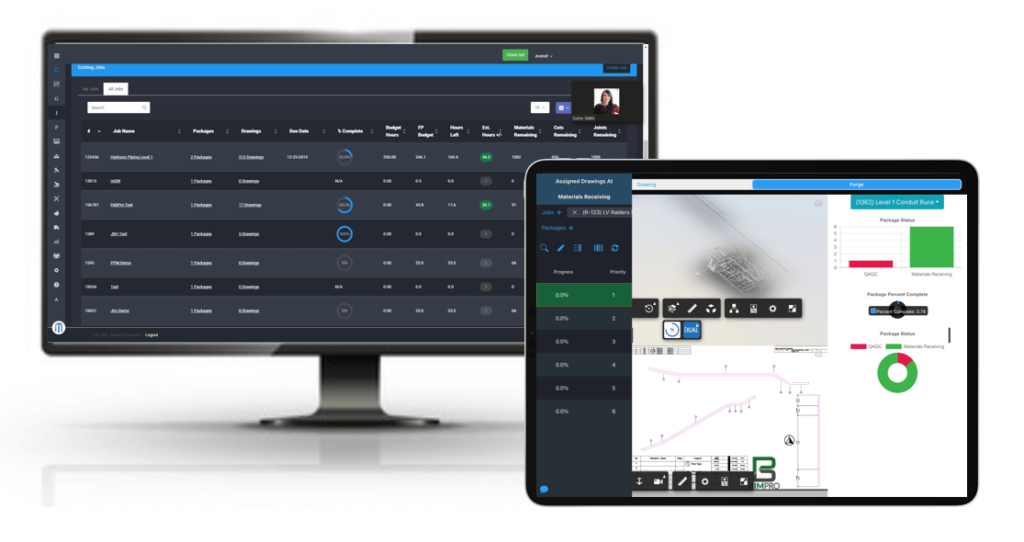
The right fabrication shop software should hold up under scrutiny — from a pilot on your own floor, a call with a peer who’s already running it, and a clear answer to every question in this guide. If a vendor can’t support that level of due diligence, that’s worth noting before you sign. Ready to see how MSUITE performs against these questions on your own project? Request a demo to run it through your real fabrication workflow.
Sources
- Dodge Construction Network & DEWALT, “Optimizing Digital Fabrication for Mechanical Contractors” SmartMarket Brief
- MSUITE, “Shop vs. Field Productivity: Why Prefabrication Wins in Construction” (AZCO / Burns & McDonnell customer story)
- MSUITE, “Bassett Mechanical Powers the Future of Fabrication” case study
- MSUITE FAB product overview