
Procore and MSUITE give MEP contractors full project visibility by connecting two records that usually live apart: the project record and the fabrication record. Procore manages drawings, RFIs, submittals, schedules and daily logs. MSUITE FAB tracks what happens in the shop, from spool release through welding, QA and shipping. Used together, the project team and the fab shop are working on a single workflow and record within the job.
What is the MSUITE and Procore integration? MSUITE is fabrication management software for MEP, industrial and modular contractors, and part of DEWALT Construction Technology. Procore is a construction management platform used by general contractors, owners and specialty contractors. MSUITE lists Procore as an integration partner. The integration syncs fabrication status, percent complete and delivery status from MSUITE back to Procore, so project managers and superintendents can see shop progress without a shop visit or a phone call.
The visibility gap between the project team and the fab shop
Most MEP contractors run two operations. The project side lives in Procore. The shop side lives in spreadsheets, whiteboards, paper travelers or a separate system. The handoff between them is where information can get lost.
The cost of that gap is well documented:
- Autodesk and FMI estimated that bad data cost the global construction industry $1.85 trillion in 2020 and caused about 14% of all rework. For a contractor with $1 billion in revenue, the study put the total cost as high as $165 million, including $7.1 million in avoidable rework.
- In a Dodge Construction Network study with Procore, 99% of specialty contractors reported profit margin erosion during construction. Projects lost an average of 5% of margin, and one third of large trade contractors said rework drives half or more of that loss.
- The same research found 39% of specialty contractors still manage critical processes on paper forms and spreadsheets.
Dodge’s 2026 research on digital fabrication points to the same root cause. Among mechanical contractors, 86% have built integrations between BIM and fabrication systems, but only half say those integrations work well. Contractors have the software. What they lack is a reliable connection between systems.
What each platform owns
An integration only helps if each system keeps the data it handles best. Trying to make either platform do the other’s job is how duplicate entry creeps back in.
| PROCORE: the project record | MSUITE FAB: the fabrication record |
|
|
|
|
|
|
|
|
|
|
Procore Scheduling, available to customers in all regions since February 2026, lets specialty contractors keep their own work plans aligned with the general contractor’s master schedule. Fabrication status from the shop is what makes those plans realistic.
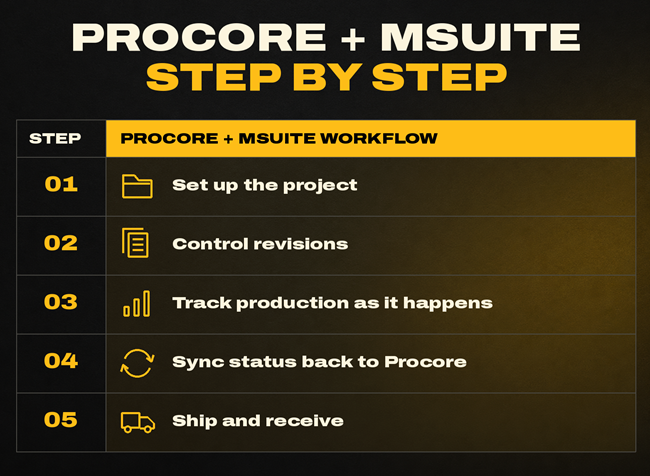
How Procore and MSUITE can work together, step by step
A typical MEP fabrication workflow with both platforms in place runs like this:
- Set up the project. The job is created in Procore with its drawings, specs and schedule. The shop sets up the same job in MSUITE using matching project numbers, so status lines up on both sides.
- Move the model to the shop. The VDC team pushes spool design and assembly data from Autodesk Revit with MSUITE BIM or Fabrication CADmep into MSUITE FAB, so the shop builds from the coordinated model instead of re-keyed cut lists.
- Control revisions. When a drawing changes, the shop’s drawing set changes with it. MSUITE applies automatic version control and pulls drawings off the shop floor when work is placed on hold.
- Track production as it happens. Crews log work against each spool. MSUITE captures hours, materials and stage completion, producing real-time earned value data the shop, field and VDC teams can all access.
- Sync status back to Procore. As spools move through the shop, fabrication status, percent complete and delivery timing can sync from MSUITE to Procore. The project manager and superintendent plan installs from that data instead of calling the shop for updates.
- Ship and receive. When the truck is loaded, MSUITE generates a bill of lading with collated drawings and the weld log, and field crews confirm receipt in a digital receiving stage.
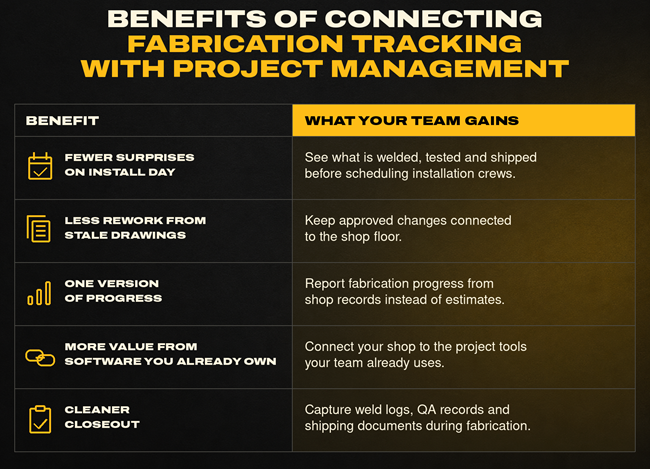
Benefits of connecting fabrication tracking with project management
- Fewer surprises on install day. Superintendents see which spools are welded, tested and shipped before they schedule crews.
- Less rework from stale drawings. Tight revision control closes the gap between an approved change and the shop floor, which is where bad data turns into rework.
- One version of progress. Project managers report fabrication progress from shop data rather than estimates.
- More value from software you already own. Dodge and Procore’s 2025 Quantifying the Value of Project Management research, based on more than 1,100 owners and contractors, linked stronger digital competency to better cost and schedule results. Connecting the fab shop extends that benefit to work most project management systems never see.
- Cleaner closeout. Weld logs, QA records and shipping documents are produced during fabrication instead of assembled at the end.
What to settle before you connect the two
The connection works best when a few decisions are made up front:
- Use the same project numbers and naming conventions in both systems.
- Agree which system is the source of truth for each data type, using the table above as a starting point.
- Map MSUITE cost codes to the codes in your Procore budget so shop hours roll up correctly.
- Decide who on the project team needs shop visibility and set user permissions to match.
Frequently asked questions
How does MSUITE integrate with Procore for MEP fabrication project management?
MSUITE can sync fabrication status, percent complete and delivery status back to Procore, where the project team already works. The data flows from the shop to the project side, which removes the manual status updates that usually pass between shop and field. MSUITE handles fabrication and leaves project management to Procore. See how MSUITE integrates with Revit, PypeServer, TigerStop and Procore.
What is the benefit of connecting MSUITE fabrication tracking with Procore project management?
It closes the visibility gap between the shop and the project team. Project managers and superintendents plan from actual fabrication status, drawing changes reach the shop faster, and closeout documents are produced during production.
Do I need to replace Procore to use MSUITE?
No. MSUITE is designed to work alongside the tools MEP contractors already use, including Procore and Autodesk Revit.
Does this workflow apply to industrial and EPC fabrication?
Yes. MSUITE FAB’s industrial features, including weld logs with heat number traceability, digital NDE tracking and post-weld routing, sit on the fabrication side of the same workflow.

See MSUITE and Procore working together. If your project team lives in Procore and your shop lives somewhere else, MSUITE can close that gap. Schedule a demo to see fabrication tracking connected to the way you already manage projects, or review MSUITE’s technology partners.
Sources
- FMI, Harnessing the Data Advantage in Engineering and Construction
- Dodge Construction Network, Top Business Issues for Specialty Contractors (with Procore)
- Business Wire, Dodge and Procore specialty contractor study release (Oct. 2022)
- Business Wire, DEWALT and Dodge Construction Network digital fabrication study (Feb. 2026)
- Dodge Construction Network, Quantifying the Value of Project Management
- Procore Support, Scheduling Overview
- Stock Titan, Dodge and Procore Quantifying the Value of Project Management release (Nov. 2025)
- MSUITE, How MSUITE Integrates with Revit, PypeServer, TigerStop, and Procore
- MSUITE FAB product page
- MSUITE Partners