
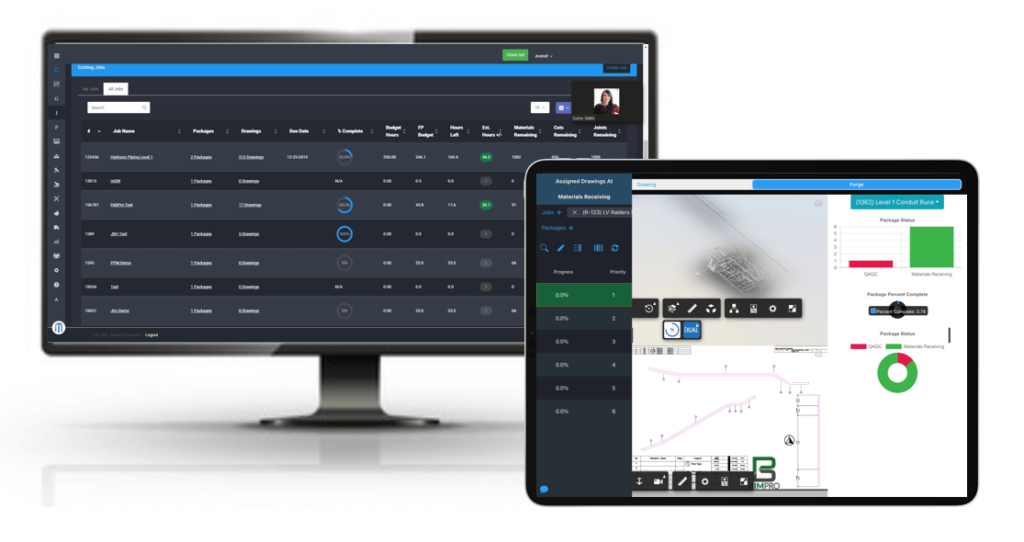
MSUITE integrates with Revit, PypeServer, TigerStop, and Procore by keeping fabrication data in one connected system instead of four separate ones. Spool and sheet metal geometry built in Revit and MSUITE BIM flows into MSUITE FAB for nesting and scheduling, cut files push directly to TigerStop saws, and production status syncs back to Procore for the project team. The result is one data set moving from design to shop to field, instead of the same information typed in four times.
Why Integration Concerns Slow Down Enterprise Adoption
Most MEP contractors already run Autodesk for design, TigerStop or PypeServer on the shop floor, and Procore for project management. Before adding new production software, buyers want to know it will work with what they already have, not replace it. That question comes up constantly in evaluations: does this plug into our stack, or does it create another island of data?
MSUITE connects BIM, FAB, and FIELD for MEP and industrial fabrication, was built around that exact problem. Rather than asking contractors to abandon Revit, PypeServer, TigerStop, or Procore, MSUITE sits between them and keeps data moving.
What Connects to What
MSUITE BIM inside Revit. MSUITE BIM installs as a ribbon directly in Autodesk Revit. Detailers set rules for spool breaks, tags, and dimensions, and the plug-in builds spool assemblies, sheet views, and bills of materials automatically. That model data becomes the source of truth for everything downstream. Contractors using MSUITE BIM have reported building spool sheets up to five times faster than manual methods, according to a Brandt Companies case study.
PypeServer for pipe and duct programming. PypeServer manages CNC programming for pipe and plate cutting equipment. MSUITE passes fabrication-ready files to PypeServer so shops don’t have to reformat drawings or manually key in cut data for each part.
TigerStop on the shop floor. TigerStop machines position and cut material to length. MSUITE’s FAB module builds the nesting layout, selects the material size that produces the least waste, and sends the cut list straight to the saw. No CSV files, no paper travelers, no re-entering dimensions at the machine.
Procore for the project team. MSUITE isn’t a project management platform, and it doesn’t try to be. It connects to Procore so fabrication status, percent complete, and delivery timing are visible to project managers and superintendents without anyone walking the shop floor to ask.
How the Data Actually Moves
1. Model in Revit.
- Detailers build the design and apply MSUITE BIM’s spooling rules to generate spool sheets, tags, and schedules automatically.
2. Send to FAB.
- Spool and sheet metal data transfers to MSUITE FAB, where it’s nested against available material and scheduled into the shop’s workload.
3. Cut with TigerStop or PypeServer.
- FAB pushes the finalized cut list to the connected saw or CNC system, eliminating manual programming at the machine.
4. Track through production.
- Barcode and QR scanning update each spool or part’s status in real time as it moves through the shop.
5. Report to Procore.
- Fabrication and delivery status sync back to Procore, so the project team sees where materials stand without a phone call.
Where MSUITE Fits in a Real Shop
Gallo Mechanical, a Gulf Coast mechanical and plumbing contractor, ran its fab shop on paper before connecting MSUITE and TigerStop. Design files went to a programmer, nest reports were printed, and a paper fab book physically traveled to the shop floor. Finding out where a job stood meant walking out to ask an operator.
After connecting MSUITE to TigerStop, Gallo’s design data uploads directly to FAB for nesting, and FAB selects the sheet size that wastes the least material. General Manager Ray McDonald reported the integration saved the company 10 percent on raw material for every job and cut manual fabrication steps to about a quarter of the time they used to take. Read the full Gallo Mechanical case study.
Comparing the Four Integrations
| Integration | Connects at | What it eliminates |
| Revit | Design/BIM stage | Manual spool drawing, tagging, and dimensioning |
| PypeServer | Shop CNC programming | Re-keying cut data for pipe and plate equipment |
| TigerStop | Shop floor cutting | Paper cut sheets and manual saw setup |
| Procore | Project management | Manual status updates between shop and field |
MSUITE Doesn’t Replace Your Stack, It Connects It
MSUITE isn’t trying to be a design tool, a CNC controller, or a project management system. It’s built to sit at the center of a contractor’s existing tools and move data between them without manual re-entry at every handoff. For IT and operations leaders evaluating fabrication software, that’s the practical question worth asking any vendor: does the platform plug into what we already run, or does it ask us to start over.
Frequently Asked Questions
Does MSUITE require replacing Revit, Procore, or existing shop equipment?
No. MSUITE is built to work alongside these systems rather than replace them. It extends Revit through a plug-in, pushes data to existing TigerStop and PypeServer equipment, and syncs status with Procore for project visibility.
How does MSUITE reduce manual data entry between BIM and the shop floor?
MSUITE carries spool and sheet metal data directly from Revit into its FAB module, then on to connected CNC and cutting equipment. Shop staff no longer retype dimensions, cut lists, or job details at each stage of production.
Can Procore users see fabrication status without visiting the shop?
Yes. MSUITE syncs production and delivery status back to Procore, giving project managers and superintendents real-time visibility into where fabricated parts stand without a shop-floor visit or phone call.
What kind of material savings have contractors seen from the TigerStop integration?
Gallo Mechanical reported saving 10 percent on raw material for every job after connecting MSUITE to TigerStop, along with faster cutting and fewer manual steps on the shop floor.
Ready to see how MSUITE connects your existing Revit, PypeServer, TigerStop, and Procore setup into one workflow? Request a demo.